


web analytics
Perşembe, Haziran 4, 2026
No Result
View All Result
  • Giriş
Türk İnternet
  • Ana Sayfa
  • BİLİŞİM
  • e-TİCARET
  • INTERNET
  • TELEKOM
  • YENİ TEKNOLOJİLER
  • Hakkımızda
  • Kişisel Verilerin Korunması
    • Çerez Aydınlatma Metni
    • İlgili Kişi Başvuru Formu
No Result
View All Result
  • Ana Sayfa
  • BİLİŞİM
  • e-TİCARET
  • INTERNET
  • TELEKOM
  • YENİ TEKNOLOJİLER
  • Hakkımızda
  • Kişisel Verilerin Korunması
    • Çerez Aydınlatma Metni
    • İlgili Kişi Başvuru Formu
No Result
View All Result
Türk İnternet
No Result
View All Result

How to Protect Yourself Against Ransomware and Stay Safe Online

Get Safe Online Day is the perfect opportunity to learn more about emerging online threats. Here, consumer security expert BullGuard offers tips and advice to guard against Ransomware – perhaps the single biggest form of malware we face today.

turk-internet.com Staff-turk-internet.com Staff
18 Ekim 2016
-Genel
0
Facebook'ta PaylaşTwitter'da PaylaşLinkedin'de Paylaş

London, 18th October 2016: Get Safe Online Day is the perfect opportunity to learn more about emerging online threats. Here, consumer security expert BullGuard offers tips and advice to guard against Ransomware – perhaps the single biggest form of malware we face today.

Ransomware is a near perfect crime. Cyber fraudsters can be thousands of miles away yet lock up a computer and all its files and demand a ransom to release them, with little risk of ever being caught.

It’s a low risk and high gain fraud. This is why it’s spreading so quickly and why today ransomware is the most common form of malware, targeting both businesses and individuals.

Typically ransoms are in the region of £500 for individuals and several thousands of pounds for businesses.

There are many ransomware families with names such as Cryptolocker, Cerber, CryptXXX, BlackShade, Crysis, Jigsaw and the appropriately named Apocalypse. There is also ransomware that specifically targets mobile devices.

These names are a way of identifying different types of ransomware but the end result is always the same – locked files, frustration, gnashing of teeth and the need to cough up the ransom.

How to avoid becoming a victim of ransomware

  • Keep an eye on the news. When a particularly virulent strain that is spreading rapidly appears, the mainstream media tends to cover it.
  • Be suspicious about emails that arrive from an organisation or people you don’t know, but also be vigilant about those you do. For example, strange requests from your bank to click a link to change your password, or a request to reply with personal details, should raise a red flag. Ransomware is often spread this way, and if there’s any doubt contact the sender to confirm they sent the message or delete it.
  • Always avoid clicking embedded links in emails that have come from a sender you don’t know or have no business with. This approach is known as social engineering and is a common trick that cyber fraudsters use.
  • Exercise a little caution if you find yourself being redirected to a web site that you weren’t looking for. If you do find yourself on such a website don’t click on any links or enter CAPTCHA codes, as this is another common way of spreading ransomware.
  • Back up your important files to lessen the potential damage done by a ransomware attack. Back up on an external device and in the cloud if you are using cloud storage service such as Dropbox or Google Drive.
  • Most importantly ensure you have good layered protection on your computer such as BullGuard Internet Security. This will block dangerous websites, including harmful links, social networks and emails that are harbouring malicious code (another name for ransomware) as well as keeping you safe against other online threats.
  • Ensure you regularly apply software updates whether it’s to the operating system, applications or browsers. Updates are designed to patch vulnerabilities that have been discovered and cyber fraudsters will often leverage these vulnerabilities to install ransomware.
Etiketler: BilgiManşet

Türk İnternet'ten buna benzer yazılar için bildirim almak ister misiniz?

ABONELİKTEN ÇIK
turk-internet.com Staff

turk-internet.com Staff

Lütfen yorum yapmak için giriş yapın.

GÜNLÜK BÜLTEN ABONELİĞİ

Aboneliğinizi onaylamak için gelen veya istenmeyen posta kutunuzu kontrol edin.

HAFTANIN ÖNE ÇIKANLARI

  • İran, ABD’ye Çok Uçak Kaybettirmiş ve Amerikalılar Çin ile Gelecekteki Savaş Konusunda Endişeli
  • Papa Leo XIV, Yapay Zeka Hakkında Çığır Açan Bir Genelge Yayınladı ve İnsanlığı “Dijital Tekel’e” Karşı Uyardı
  • ABD, Çin ile Teknoloji Yarışı Yoğunlaşırken Büyük Bir Kuantum Teknolojisi Yatırım Hamlesi Başlattı
  • OSIRIS AI, Palantir’in Vizyonuna Meydan Okuyan Bir Rakip mi?
  • SpaceX ve OpenAI Halka Arza Hazırlanıyor, Ancak Piyasa Karışık Sinyaller Veriyor

HAFTANIN KELİMESİ

3GPP

3. Nesil Ortaklık Projesi (3GPP), dünya çapında çeşitli mobil (hücresel) ve telekomünikasyon standartlarını geliştiren ve sürdüren bir grup standart kuruluşudur.

3G ile birlikte kurulmuş ve telekom endüstrisinin Birleşmiş Milletleri diye tanımlanabilir. Sonraki nesiller için de standartları belirlemiştir.

Detayı için Wiki-Turk'e bakınız

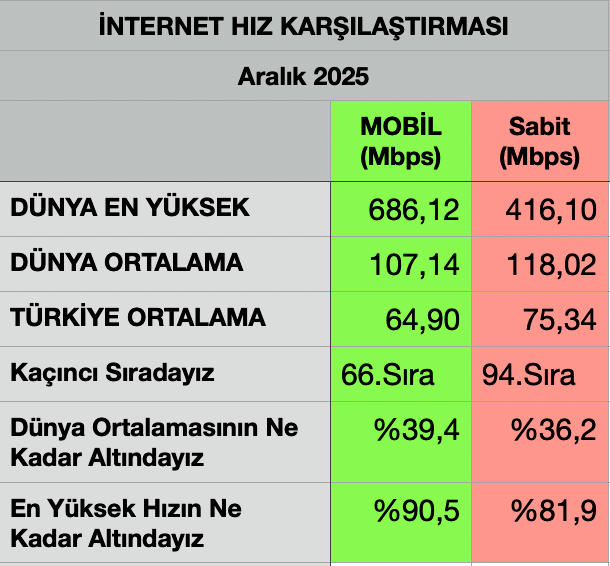
İNTERNET HIZI

Türkiye'nin İnternet Hızlarını Dünya ile KarşılaştırmakKaynak : https://www.speedtest.net/global-index#mobile
Facebook Twitter LinkedIn

Bildirimler

Turk-internet.com masaüstü bildirimlerini almak için lütfen buraya tıklayın

Son Yorumlar

  • ICANN, Yeterince Temsil Edilmeyen Toplulukları Yeni gTLD Başvuru Destek Programı İle Güçlendiriyor için Tolga Kaprol
  • BTK, Yabancı e-SIM Firmalarını Engelledi için Bulent SEN
  • Sahibinden.com Domain’inin Güncellenmesi Unutulmuş için Tolga Kaprol
  • İngiliz Düzenleyici Ofcom, Bulut Servislerini ve Akıllı Cihaz Pazarını Soruşturuyor için Tolga Kaprol
  • Seçim Yaklaşırken, Kişisel Veriler Kötüye Nasıl Kullanılır? için [email protected]

Türk İnternet'ten ilginize çekecek yazılar için bildirim almak ister misiniz?

Abone Ol

© Copyrights 2000-2025 - Bu sitede yayınlanan haber/söyleşi/makale ve bilgilerin tüm hakkı turk-internet.com'a aittir.

Tekrar Hoşgeldiniz!

Aşağıdan hesabınıza giriş yapınız

Şifremi unuttum?

Şifrenizi geri alın

Lütfen şifrenizi resetlemek için kullanıcı adı veya email adresinizi girin.

Giriş yap
No Result
View All Result
  • Ana Sayfa
  • BİLİŞİM
  • e-TİCARET
  • INTERNET
  • TELEKOM
  • YENİ TEKNOLOJİLER
  • Hakkımızda
  • Kişisel Verilerin Korunması
    • Çerez Aydınlatma Metni
    • İlgili Kişi Başvuru Formu

© Copyrights 2000-2025 - Bu sitede yayınlanan haber/söyleşi/makale ve bilgilerin tüm hakkı turk-internet.com'a aittir.